
Share This Article
Academic projects tend to generate hundreds, sometimes thousands, of sources across multiple databases, PDFs, and web pages. Keeping track of all of them by hand quickly becomes unworkable, which is why reference management for research has become a standard part of scholarly workflows. EndNote approaches this problem by combining capture, organization, and citation into a single connected system rather than three separate habits.
Why Academic Researchers Need Centralized Reference Management
A single literature review can pull from journal databases, institutional repositories, and web sources, each with its own citation format. Without a central system, researchers end up copying details into spreadsheets or sticky notes, which invites errors. Centralized reference management for research reduces that scattering by keeping every source, note, and PDF in one searchable library. That consolidation matters most when a project stretches across months or years and involves revisiting earlier sources.
Capturing and Organizing Sources with EndNote’s One-Click Import
EndNote lets researchers import references from databases, PDFs, and websites with a single click through a browser extension. Instead of manually typing author names, publication dates, and journal titles, the tool captures that metadata directly from the source. This cuts down on transcription errors that often creep into manually built bibliographies. The browser-based capture tool works alongside existing research habits, so a literature search does not need a separate second step just to log what was found.
Smart Organization: Tags, Groups, and Custom Folders in EndNote
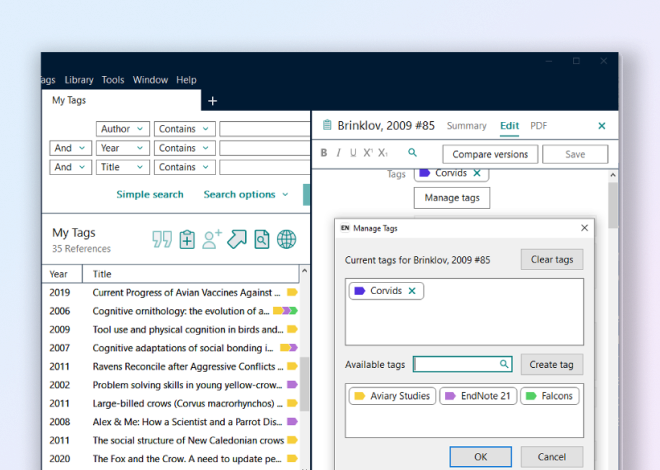
Once references are captured, EndNote offers smart groups, tags, and custom folders to keep thousands of entries manageable. A researcher working across several papers can separate sources by project, theme, or chapter without duplicating files. Tags make it possible to flag sources by relevance or status, which helps when returning to a library after a break. This structure turns a simple reference management for research into an actual workspace rather than a static list. The organizational features allow research teams to maintain consistency across collaborative projects, as all members access the same tagged and grouped library from a centralized location.
Cloud Sync and Team Collaboration Across Devices

EndNote libraries sync through secure cloud storage, so a researcher can move between a laptop, office desktop, and other devices without losing track of sources. That same cloud layer supports team collaboration, allowing colleagues to share libraries and work from the same reference set in real time. For research groups split across departments or institutions, this means less time spent reconciling separate citation lists. EndNote Fusion extends this further, supporting activities from managing references and evidence to collaborating with colleagues, writing manuscripts, and preparing work for publication.
Citation Styles and Seamless Integration with Word and Google Docs
Formatting citations correctly is one of the more tedious parts of academic writing, and EndNote addresses it by offering access to over 7,000 citation styles, including APA, MLA, and Chicago. Switching between styles happens instantly, which matters when a manuscript is submitted to one journal and then resubmitted elsewhere with different formatting rules. The platform integrates directly with Microsoft Word and Google Docs, so citations and bibliographies are inserted while writing rather than added afterward. That kind of integration keeps reference management for research connected to the actual drafting process instead of treating it as a separate task done at the end. The ability to work across multiple writing platforms eliminates friction when moving between different tools throughout a research project.
From Capture to Publication: The Complete Research Workflow
Looking at the full cycle, from early-stage searching to final manuscript preparation, shows why an integrated approach matters. EndNote Fusion is built on trusted research information and is designed to fit into existing workflows through extensive integrations with the tools, platforms, and resources researchers already use. It supports discovering insights from the literature, citing accurately, and making informed publishing decisions. For librarians overseeing adoption across an institution, it also provides governance, visibility, and administrative controls needed to support successful adoption at scale.
A comprehensive system differs from basic bookmarking or manual citation tracking in several concrete ways. The list below outlines what separates a structured approach from ad hoc methods.
- One-click capture pulls full metadata from databases, PDFs, and websites instead of requiring manual entry.
- Smart groups, tags, and custom folders organize large reference libraries by project or theme.
- Cloud sync keeps a single library accessible and current across multiple devices.
- Team collaboration features allow shared libraries and real-time work among co-authors.
- Direct integration with Word and Google Docs inserts formatted citations and bibliographies during writing rather than after.
- Access to over 7,000 citation styles allows instant switching when submission requirements change.
Taken together, these features show why dedicated reference management for research tools exist alongside simpler bookmarking habits. Bookmarks and manual notes can capture a link or a title, but they rarely preserve full citation metadata or organize sources for later retrieval. As research projects grow in scale, that gap becomes a real obstacle to writing efficiently.
Millions of researchers at the world’s top universities and organizations trust their work to EndNote, and as research continues to expand in volume and complexity, the need for integrated reference management continues to grow.
