
Share This Article
A keyboard is the interface between you and your work. You touch it more than any other item on your desk. It should feel good, look intentional, and disappear into the background when you focus on actual tasks. Most keyboards are either bulky and utilitarian or overly complicated with backlighting and macro keys that add visual chaos. A wireless keyboard from a brand that understands minimalist design changes how your workspace feels. Quality wireless keyboards offer the freedom of no cables, the cleanliness of an uncluttered desk, and the premium feel of thoughtful engineering. They work across devices seamlessly, charge efficiently, and last months between charging cycles. The difference between a generic wireless keyboard and one engineered with attention to typing experience is immediate. Keys respond with satisfying feedback. Typing feels effortless rather than labored. Your hands do not fatigue even after hours of work. This is not subtle. Poor keyboards cause genuine hand strain and fatigue. Quality keyboards make long typing sessions more comfortable. A workspace with the right keyboard feels like it was designed for focus rather than assembled from random components. Satechi wireless keyboards combine minimalist aluminum construction, responsive mechanical keys, and multi-device connectivity that transforms your workspace into a focused, professional environment. The right keyboard is an investment in daily comfort and work quality.
Minimalist Design Philosophy: Less Clutter, More Focus
Workspace aesthetics matter more than most people realize. Your visual environment affects your mental state. A workspace cluttered with cables, bulky equipment, and visual noise creates low-level stress even when you do not consciously notice. A workspace designed with intentional minimalism creates clarity. Every item belongs. Nothing is superfluous. A wireless keyboard is a minimalist solution to the cable problem that plagues most desks. Traditional wired keyboards require a cable running from your keyboard to your computer, usually a thick cable that gets tangled, bent, and eventually fails at the connection points. Wireless keyboards eliminate this entirely. Your desk surface is cleaner. Your cable management problem is simpler. The keyboard itself can be designed without accommodating a cable port, allowing manufacturers to create slimmer, more elegant designs. Satechi keyboards use aluminum or premium plastic construction that matches modern devices. They are compact, without unnecessary buttons or accessories that clutter the visual space. The color options are typically neutral or sophisticated, grays, blacks, silvers, that coordinate with other desk accessories rather than competing with them. This minimalist approach is not accidental. It is intentional design from companies that understand that focus is valuable and workspace clutter is an obstacle to focus. Satechi keyboards reduce desk clutter by eliminating cables while maintaining a minimalist aesthetic that keeps your workspace visually calm and focused. Design clarity supports mental clarity.
Wireless Connectivity: Freedom From Cable Constraints
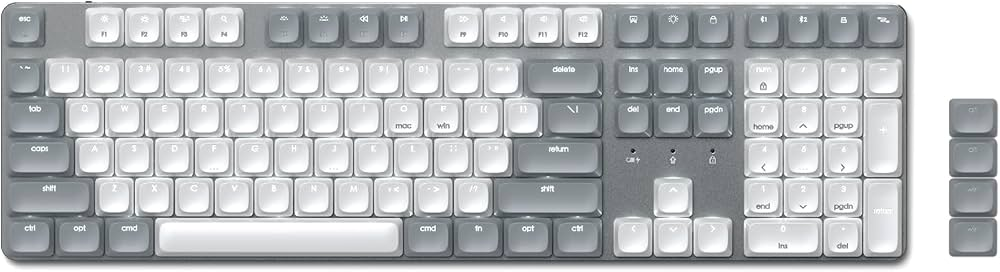
Wireless keyboards use either Bluetooth or USB receiver connectivity. Bluetooth keyboards pair with your device once and maintain connection within twenty to fifty feet depending on model. USB receiver keyboards use a small dongle plugged into your computer that the keyboard communicates with via wireless signal. Both work effectively. Bluetooth offers cleaner aesthetics because no external receiver is visible. USB receivers work better in environments with interference or where devices are frequently paired and untroubled. Most quality wireless keyboards support multiple device pairing. Your keyboard can instantly switch from your computer to your iPad to your phone depending on which device you want to type on. This flexibility is transformative for anyone who works across multiple devices. You can take notes on your iPad with the comfort of a quality keyboard instead of struggling with an onscreen keyboard. You can draft email on your computer, then switch to your phone to send it, all using the same keyboard. This seamless switching is not just convenient, it makes your entire workflow smoother. The lack of cables also means you can position your keyboard exactly where it is comfortable for your posture. With a wired keyboard, the cable path constrains positioning. With a wireless keyboard, you can adjust height, angle, and distance until you find the ergonomic position that works best. Poor keyboard positioning causes long-term wrist and arm strain. Optimizing your keyboard position through wireless freedom actually prevents injury. Wireless connectivity lets you position your Satechi keyboard for optimal ergonomics and instantly switch between multiple devices without cable repositioning. Freedom enables better posture.
Key Response and Typing Experience: Mechanics That Matter
The actual typing experience separates a keyboard you enjoy using from a keyboard you tolerate. This comes down to key mechanics. Each keystroke should have a certain actuation distance, the distance the key travels before the keystroke is registered. It should have a certain actuation force, how much pressure is required. It should give tactile or audible feedback that the keystroke registered. Keys that require heavy pressure cause finger fatigue. Keys with too little feedback leave you uncertain whether your keystroke registered. Keys with mushy response feel spongy and unsatisfying. The ideal keyboard provides medium actuation force, clear tactile response, and satisfying key travel. This means you can type quickly without thinking about the keyboard mechanics. Your hands just work. Different keyboard types offer different feel. Mechanical keyboards use individual springs under each key, offering maximum tactile feedback but adding bulk and noise. Scissor-switch keyboards use a compressed mechanism under each key, offering a lower profile with decent feedback. Capacitive keyboards register keystroke position optically, offering smooth response with minimal feedback. Quality wireless keyboards typically use scissor-switch or capacitive mechanics tuned for responsiveness without excessive noise. This balances tactile satisfaction with the quiet operation appropriate for shared workspaces. Satechi keyboards are engineered with precise key mechanics that provide responsive feedback without excessive noise, enabling comfortable all-day typing. Mechanics translate to comfort.
Battery Life and Charging Efficiency for Uninterrupted Work

Wireless keyboards require batteries or rechargeable power. The difference in battery life between quality keyboards and budget alternatives is dramatic. A budget wireless keyboard might last three to six weeks before requiring battery replacement or charging. A quality wireless keyboard can last three to six months on a single charge. This difference is the result of efficient electronics and low-power wireless protocols. The keyboard only transmits when keys are pressed, not continuously broadcasting. The wireless chip uses minimal power. The display is eliminated or minimal. These engineering choices extend battery life dramatically. Some wireless keyboards ship with rechargeable batteries built in. Others use standard AA or AAA batteries. Rechargeable batteries are more convenient, you charge the keyboard rather than replacing batteries, but require you to remember charging. Standard batteries are more flexible, you can swap in fresh batteries immediately without waiting for charging, but generate waste and require keeping batteries in stock. The most practical solution is a keyboard with built-in rechargeable batteries and a USB charge port. You charge your keyboard once a week or month depending on usage, similar to charging your phone. Satechi wireless keyboards offer weeks of battery life with efficient charging that requires attention only occasionally, keeping your keyboard ready to use without frequent maintenance. Efficiency means less distraction from charging.
Multi-Device Support and Productivity Across Your Ecosystem
Modern work involves multiple devices. You work on a desktop computer. You answer email on your laptop. You take notes on your tablet. You collaborate on a phone call. A quality wireless keyboard that pairs instantly with any device transforms this multi-device workflow. Instead of hunting for each device’s keyboard or struggling with onscreen keyboards, you use your wireless keyboard. The typing experience is consistent. The speed is fast. The productivity gains are real. Pairing is typically straightforward. You put the keyboard in pairing mode, select it from your device settings, and you are connected. Most keyboards support up to three or four device pairings. You can quickly toggle between devices with a single keystroke or button press, often a key combination or dedicated button on the keyboard. This instant switching keeps you in your workflow without the friction of hunting for a different input method. For anyone who works across Windows, Mac, and iPad or any combination of devices, multi-device support is essential. Single-device keyboards force you to compromise on at least one platform. Multi-device keyboards work everywhere you work. Satechi keyboards instantly pair and switch between multiple devices, maintaining productivity across your desktop, laptop, tablet, and phone without searching for alternative input methods. Multi-device support is increasingly essential.
Building Your Workspace: Integration With Other Desk Accessories
A quality keyboard is the foundation of a workspace but rarely the only component. Consider how your keyboard works with your monitor, desk surface, and other accessories. A keyboard engineered with minimalist aesthetics typically pairs well with other thoughtfully designed products. Color coordination matters. A gray aluminum keyboard matches a gray monitor stand and gray desk lamp, creating visual harmony. Neutral keyboards work with diverse desk environments. Size matters. A compact wireless keyboard saves desk space compared to a full-size traditional keyboard. This is especially valuable if you have limited desk surface or like keeping your workspace sparse. Positioning matters. A wireless keyboard can sit between you and your monitor, or to the side, or far to the left if you prefer. This flexibility lets you create a workspace layout that feels right for your workflow. Consider these aspects when building your complete workspace: Choose a keyboard color and aesthetic that coordinates with your monitor, desk, and other visible components. Decide whether a compact keyboard suits your layout or whether a full-size keyboard is necessary for your typing comfort. Position the keyboard at elbow height with forearms parallel to the desk to minimize wrist strain. Pair your keyboard with a mouse or trackpad in the same aesthetic family for visual coherence. Keep your desk surface minimalist by eliminating visible cables and unnecessary items. A thoughtfully designed workspace is more than aesthetic. It is more functional. You work more effectively in an environment that feels intentional rather than assembled randomly. You focus more easily when your visual surroundings are calm. A quality wireless keyboard is a single investment that improves both aesthetics and functionality. Satechi keyboards integrate seamlessly into minimalist workspaces, pairing well with other thoughtfully designed accessories to create a cohesive, productive environment. Workspace design is workflow design.
