
Share This Article
Audio editing tools have changed a lot in the last few years. Creators are producing podcasts, YouTube videos, music tracks, and voiceovers from home studios more than ever. Because of that, many editors are looking for software that is powerful but still easy to manage during long editing sessions.
That search has led many people to discover Soundop, a full featured audio editing application designed for recording, editing, mixing, and mastering in one place. Instead of switching between multiple programs, creators can handle most of their audio production tasks inside a single workflow.
More importantly, many users say the tool feels efficient once you start using it regularly.
TL;DR
- Audio creators want tools that simplify recording, editing, and mixing
- Soundop combines multitrack editing and mastering tools in one program
- The software supports modern plugin formats and professional workflows
- Many creators use it for podcast editing, music production, and voiceover work
- A streamlined interface helps reduce time spent navigating complex menus
Why Workflow Matters More Than Features
Most people searching for audio editing software already know that modern editors offer dozens of features. The real challenge is how those tools fit into a daily workflow.
For example, podcast producers often spend hours cleaning background noise, adjusting levels, and cutting sections of audio. Music creators have another set of tasks such as layering tracks, mixing instruments, and exporting masters.
Tools that slow down those processes can quickly become frustrating.
This is where Soundop has been gaining attention. Instead of separating editing and mixing into different environments, the program allows users to move between waveform editing and multitrack mixing without changing applications.
That small difference can save a lot of time during large projects.
A Practical Option for Podcast Editors
Podcast production has grown rapidly, and many creators search for reliable podcast editing software that can handle recording, trimming, and sound enhancement.
Soundop includes several features that make podcast editing easier:
- Multitrack recording for interviews and conversations
- Precise waveform editing for cutting mistakes
- Built in effects for noise reduction and audio cleanup
- Support for professional plugins used in voice processing
For creators who publish episodes weekly, the ability to manage recording and editing inside one program can simplify the entire process.
Many podcasters also appreciate the clear layout of the interface. The editing tools are visible without digging through multiple panels, which helps new users get comfortable quickly.
Useful Tools for Music and Sound Design
Music producers often need more advanced capabilities than basic editing. A good multitrack audio editor should allow users to mix several audio layers, apply effects, and adjust levels without lag.
Soundop supports common plugin formats such as VST and VST3. That means producers can use their favorite instruments and effects alongside the built in tools.
This flexibility makes it easier to integrate the software into an existing studio setup.
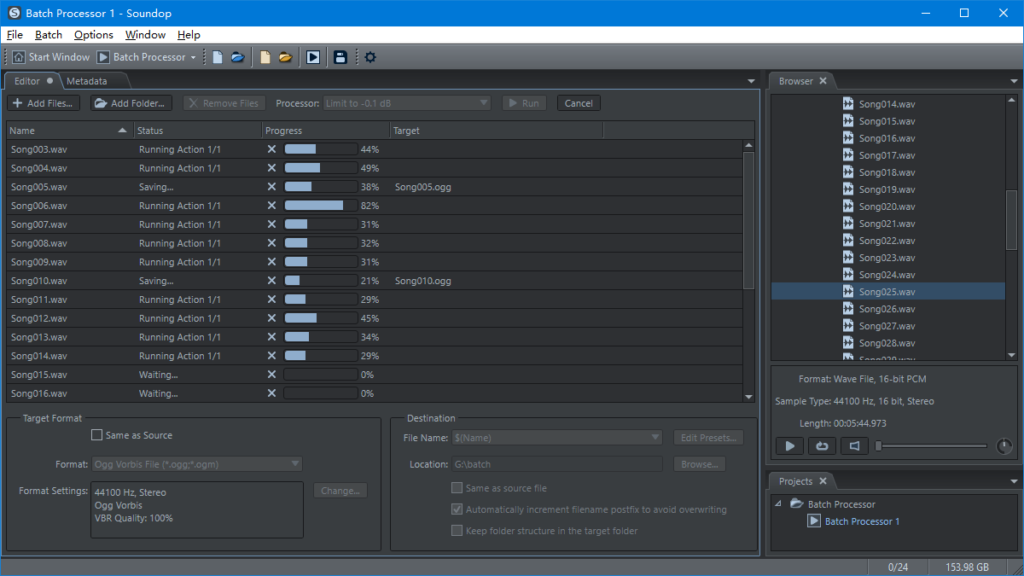
Producers working with sound design or background music also benefit from batch processing tools. These allow multiple files to be edited or converted at the same time, which is helpful when preparing sound libraries or podcast segments.

Built for Recording and Mixing in One Place
Another reason creators explore Soundop is its ability to combine several production stages in one environment.
Instead of recording audio in one application and exporting it to another recording and mixing software, users can capture audio directly inside the editor. After recording, the same project can move into editing and mixing without exporting files between programs.
This type of workflow is especially helpful for YouTubers and content creators who produce audio regularly.
When editing voiceovers or narration tracks, creators can record, trim, apply effects, and export final audio from the same session.
Who Might Find Soundop Useful
Different creators approach audio production in different ways, but several groups often benefit from this type of software.
Podcast hosts who record weekly shows usually want something reliable and fast. Music producers often need plugin support and detailed editing tools. Video creators and voice artists usually look for an efficient audio production software that fits into their existing workflow.
Soundop sits in the middle of those needs.
It offers professional tools while still remaining manageable for users who are not running a full studio environment.
Is Soundop Worth Trying for Your Editing Workflow
Audio creators often spend years testing different tools before finding the right setup. Some prefer large digital audio workstations, while others want something more focused on editing and mixing.
Soundop appeals to creators who want a streamlined environment where recording, editing, and mastering can happen together.
If your current workflow involves jumping between several tools just to finish a project, exploring Soundop could be worth considering. Many creators find that a simpler editing environment helps them focus on the creative side of audio production instead of managing complicated software.
