
Share This Article
Managing digital documents efficiently has become essential for both personal and professional tasks. From editing PDFs to organising files, having the right software can save time and improve productivity. This is where PDF Expert stands out, offering a robust solution designed to simplify how users interact with PDF files.
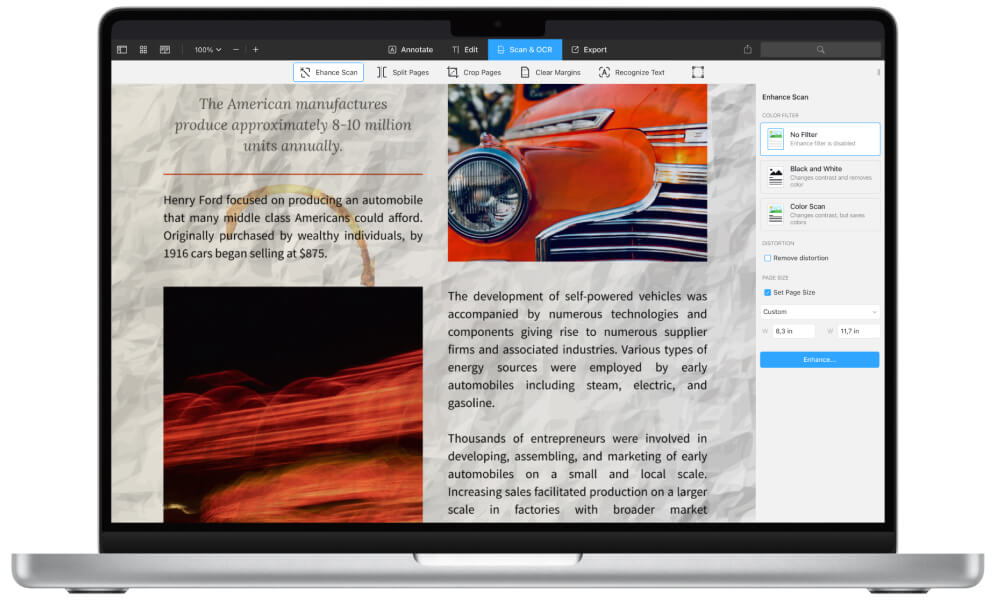
The software is widely recognised for its clean interface and powerful features that make working with documents seamless. Whether it is reading, editing, or annotating, PDF Expert provides tools that are intuitive and reliable.
Keypoints
- Offers advanced PDF editing and annotation tools
- Clean and user friendly interface for easy navigation
- Supports document organisation and file management
- Suitable for both personal and professional use
- Fast performance with smooth file handling
- Designed to improve productivity and workflow
A Comprehensive Set of Features for Everyday Use
One of the main strengths of PDF Expert is its wide range of features that cater to different document needs. Users can edit text, adjust images, and manage pages within a PDF without needing multiple tools.
Annotation features are particularly useful for reviewing documents. Users can highlight text, add comments, and mark important sections with ease. This makes it ideal for students, professionals, and anyone who regularly works with documents.
The software also supports file organisation, allowing users to merge, split, and rearrange PDFs. These features help streamline workflows and keep documents structured in a way that suits individual preferences.
Another important aspect is compatibility. PDF Expert works smoothly across devices, ensuring that users can access and manage their files wherever they are.
Performance and Ease of Use
A key reason why users choose PDF Expert is its performance. The software is designed to handle files quickly, even when working with large documents.
The interface is clean and straightforward, which reduces the learning curve. Users can easily find the tools they need without navigating through complicated menus. This simplicity enhances productivity by allowing users to focus on their tasks rather than figuring out how the software works.
Speed is another advantage. Opening, editing, and saving documents happens without noticeable delays, making it suitable for fast paced work environments.
Designed for Productivity and Flexibility
Productivity is at the core of PDF Expert. The software is built to support efficient workflows, helping users complete tasks more quickly and accurately.
Features such as search functionality and document navigation make it easy to locate specific information within large files. This is particularly useful for professionals who deal with extensive documents on a regular basis.
Flexibility is another important factor. Users can customise their workflow by organising documents in a way that suits their needs. Whether it is managing contracts, reports, or study materials, the software adapts to different use cases.
Additional Benefits of PDF Expert
- Smooth and fast document rendering
- Reliable editing tools for text and images
- Easy navigation within large PDFs
- Supports efficient document workflows

Pros and Cons of PDF Expert
Understanding the advantages and limitations of PDF Expert can help users decide if it meets their requirements.
Pros
- Intuitive interface that is easy to use
- Strong editing and annotation capabilities
- Fast performance with minimal lag
- Suitable for a wide range of document tasks
Cons
- Some advanced features may require a paid version
- Limited functionality compared to enterprise level tools
- May not support all niche PDF features
Why Users Prefer PDF Expert
Many users turn to PDF Expert because it simplifies document management. Instead of relying on multiple tools, they can handle everything in one place.
For professionals, the ability to edit and annotate documents efficiently is a major advantage. For students and everyday users, the ease of use and speed make it a practical choice for managing files.
The balance between functionality and simplicity is what sets the software apart. It provides powerful tools without overwhelming the user, making it accessible to a wide audience.
Final Thoughts on PDF Expert
PDF Expert has established itself as a dependable solution for managing and editing PDF files. Its focus on performance, usability, and productivity makes it a valuable tool for anyone working with digital documents.
By offering a combination of essential features and a user friendly experience, it continues to meet the needs of modern users. For those looking to improve how they handle PDFs, PDF Expert provides a reliable and efficient option.
