
Share This Article
Designing a home layout from scratch can feel overwhelming, especially when traditional design software is too technical or time consuming. This Live Home 3D review looks at how the platform simplifies home design with intuitive tools and realistic visualizations. If you are searching for a home design software that helps you plan spaces without a steep learning curve, this guide will give you a clear idea of what to expect.
- User Friendly Interface the layout is clean and easy to navigate, making it simple for beginners to start designing without prior experience
- 2D And 3D Design Modes switch between floor plans and realistic views to better understand how your space will look
- Extensive Object Library access furniture, materials, and decor options to customize designs without needing external assets
- Real Time Rendering see changes instantly, which helps speed up decisions and reduces guesswork
- Cross Platform Availability works across multiple devices, allowing flexibility in how and where you design
View all on Live Home 3D
Getting Started With Home Design Without The Learning Curve
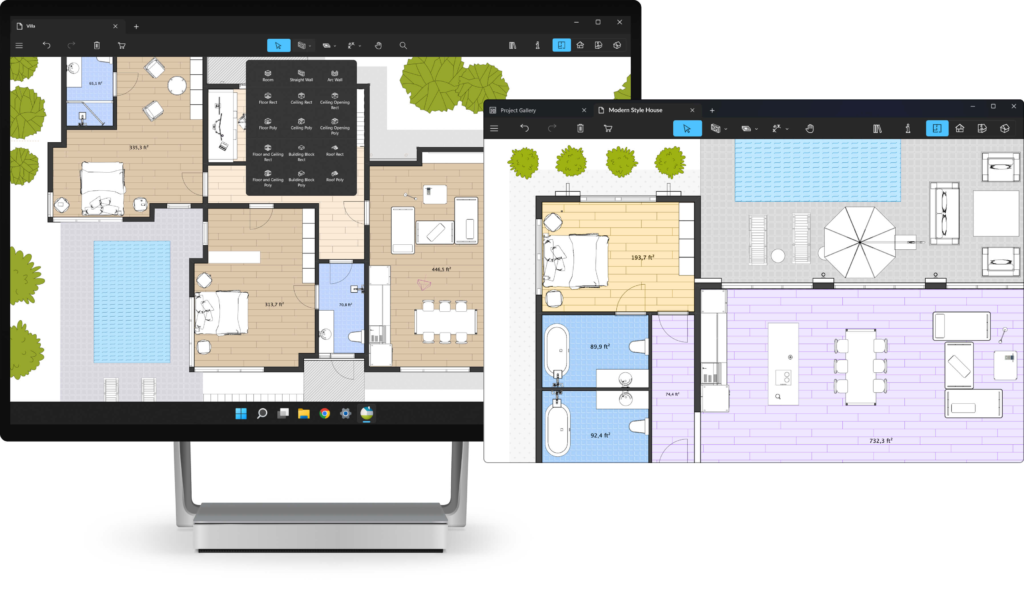
Live Home 3D focuses on making home design accessible to everyday users. The interface is straightforward, which helps reduce the intimidation that often comes with design tools.
Instead of dealing with complicated menus, users can quickly start drawing layouts and adding elements. This makes it easier to move from idea to visual plan without spending hours learning the software.
You can explore features directly on the Live Home 3D where the platform showcases how simple it is to begin designing right away.
Switching Between 2D Plans And 3D Visuals
One of the most useful aspects highlighted in this Live Home 3D review is the ability to move between 2D and 3D views seamlessly. This feature helps users understand both structure and appearance in a single workflow.
You can sketch out floor plans in 2D, then instantly view them in 3D to see how the space comes together. This reduces confusion and makes it easier to spot design issues early.
Key benefits include
- Better visualization of room layouts
- Immediate feedback on design changes
- Improved confidence when planning spaces
For users who struggle to imagine how a layout will look in real life, this feature adds practical value.
Customizing Spaces With Built In Assets

Another strong point in this Live Home 3D review is the built in object library. Users can choose from a wide range of furniture, textures, and materials without needing to import additional files.
This makes customization more convenient and keeps the design process flowing without interruptions. You can experiment with different styles and layouts quickly.
Notable features include
- Large selection of furniture and decor items
- Material options for walls, floors, and surfaces
- Easy placement and adjustment of objects
This flexibility helps users create designs that feel more personalized and realistic.
Real Time Updates That Save Time
Live Home 3D stands out by offering real time rendering, which allows users to see changes as they happen. This reduces the need for constant previews or manual updates.
When you adjust a layout or change materials, the updates appear instantly. This speeds up the design process and helps users make decisions more efficiently.
Why this matters
- Faster design adjustments
- Less waiting for previews to load
- More accurate representation of ideas
You can get a better sense of how this works by visiting the Live Home 3D where examples highlight the real time capabilities.
Performance And Accessibility Across Devices
A good home design software should work smoothly across different devices, and Live Home 3D delivers on this. It is available on multiple platforms, allowing users to design on desktops, tablets, or other supported devices.
The software runs efficiently without requiring high end hardware, which makes it accessible to a wider range of users.
Key advantages include
- Compatibility with different operating systems
- Smooth performance on standard devices
- Flexibility to design from various locations
This makes it easier to continue projects without being tied to a single device.
Who Live Home 3D Works Best For
This Live Home 3D review shows that the software is ideal for users who want a balance between simplicity and functionality. It is especially useful for those who need practical design tools without advanced technical requirements.
It is a strong fit for
- Homeowners planning renovations or layouts
- Interior design beginners exploring ideas
- Students working on basic design projects
If your goal is to visualize and plan spaces without dealing with overly complex software, Live Home 3D provides a clear and approachable solution.
Final Thoughts On Live Home 3D
Live Home 3D offers a straightforward way to design and visualize spaces without unnecessary complexity. It combines essential design tools with an interface that feels easy to use from the start.
The ability to switch between 2D and 3D views, customize designs, and see real time updates makes it a practical choice for everyday users. While it may not replace advanced architectural software, it delivers exactly what most users need for planning and visualization.
For anyone looking to simplify the home design process, Live Home 3D provides a reliable and accessible option that helps turn ideas into clear visual plans.
