

Share This Article
Finding a free PDF signing app that skips accounts, cloud storage, and recurring plans can be harder than expected. Many productivity tools push a login or a subscription before letting anyone touch a contract. eSign: Sign PDF DOCX Documents (iOS only) offers an alternative built around on-device signing for PDF and DOCX files, aimed at professionals handling sensitive paperwork on a budget.
Why eSign Stands Apart: On-Device Signing Without Cloud Dependency
Most document-signing tools route files through a cloud server at some point, even if only briefly. eSign: Sign PDF DOCX Documents (iOS only) processes everything locally on an iPhone or iPad, so a contract never leaves the device during editing or signing, and no data from that document is uploaded or collected anywhere else. That distinction matters for anyone who treats a free PDF signing app as a tool for sensitive paperwork rather than casual forms.
There is no account to create and no cloud sync to configure, so a document can be opened, signed, and exported without any registration step standing in the way. That immediacy sets it apart from heavier office suites built around collaboration features.
Signing PDF and DOCX Documents in Minutes on Your iPhone or iPad
The core workflow focuses on speed. PDF, DOCX, and image files can be imported and signed in a few taps, without navigating multiple menus or settings screens. The interface stays minimal and distraction-free, keeping attention on the document rather than on the software wrapped around it.
This simplicity reflects a deliberate trade-off. Instead of offering every feature a full office suite might include, eSign: Sign PDF DOCX Documents (iOS only) concentrates on the essentials needed to prepare contracts, forms, and agreements. For a quick signature on a lease, invoice, or internal memo, that narrower focus often saves time rather than costing functionality.
Building Multi-Page Documents: Combining Scans and Photos into a Single PDF
Paperwork rarely arrives as a single tidy file. A contract might include a scanned signature page, a photographed ID, and a typed form, and assembling those pieces by hand is tedious. eSign: Sign PDF DOCX Documents (iOS only) allows scans, photos, and existing documents to be combined into one PDF, keeping a multi-part agreement organized as a single file.
Beyond simple assembly, pages can be added, deleted, or reordered so the final document follows a logical sequence. Cropping removes unwanted margins or background clutter from a scanned page, and rotation controls let each page land in the correct orientation before export. These tools cover the kind of cleanup that otherwise sends people searching for a separate scanning app, which is part of why a free PDF signing app with built-in assembly tools saves a step.
Export Quality and Offline Capability: eSign’s 300 DPI Standard
While editing, the app displays an optimized preview at roughly 72 to 92 DPI to keep performance smooth on a phone or tablet screen. That lighter preview is not the final output, though. Once a document is ready, eSign: Sign PDF DOCX Documents (iOS only) renders the export at up to 300 DPI, producing sharp text and clean signatures instead of a blurry or muddy scan.
That export quality matters for anything destined for print or long-term storage, such as a signed lease or an archived agreement. Offline support means this high-resolution export happens without needing an internet connection at all. For a free PDF signing app aimed at professionals working outside an office, that offline reliability can matter as much as the resolution itself.
Free Access with Optional Premium Features
The app is free to use, with optional in-app purchases layered on top for anyone who wants additional functionality. That structure lets a first-time user complete a full signing workflow, including import, assembly, and export, without being blocked by a paywall partway through. The list below outlines what is available without paying for anything extra.
- PDF, DOCX, and image files, including scans, can be imported regardless of file size.
- Multiple scans, photos, and documents can be combined into a single assembled PDF.
- Pages can be added, deleted, reordered, cropped, and rotated before the document is finalized.
- Finished documents can be exported as a full PDF or saved as a single-page image.
- Every one of these actions works fully offline, with no server processing involved.
This list reflects a practical approach to the free PDF signing app category. Instead of gating the basic act of signing a document, optional purchases are reserved for extras layered on top of a workflow that already functions end to end.
Privacy and Security When Handling Sensitive Contracts and Forms
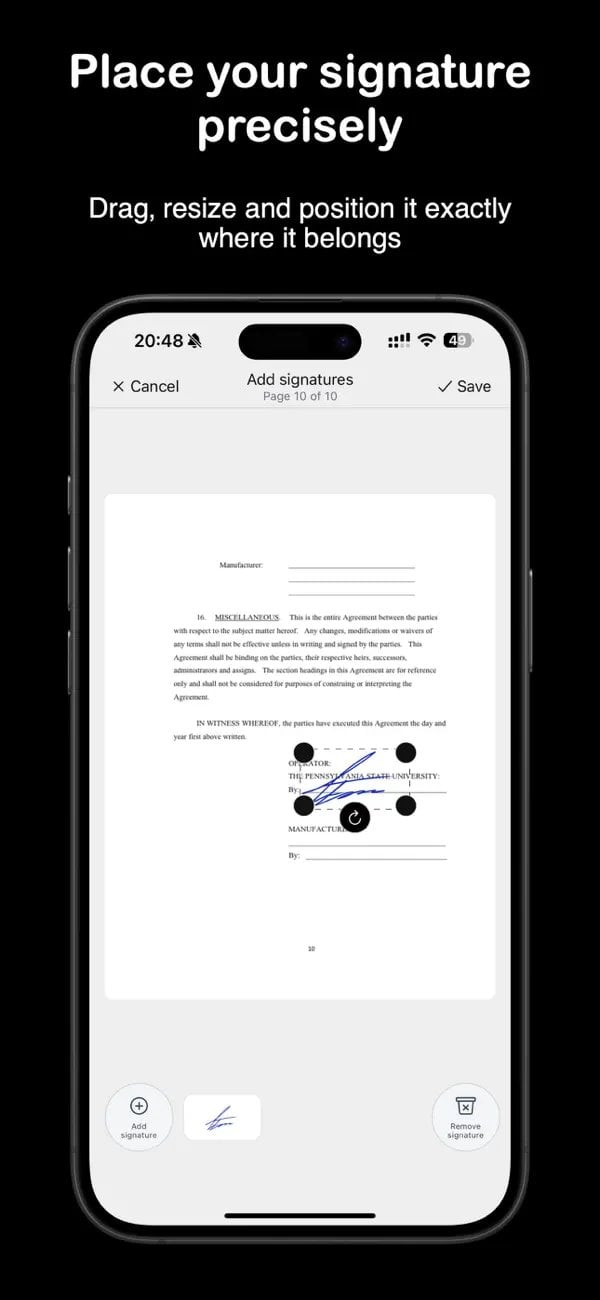
Signing a contract, a tax form, or an internal company document often means handling details nobody wants floating through an unfamiliar server. eSign: Sign PDF DOCX Documents (iOS only) keeps every step of signing on the device itself, with no account, no registration, and no cloud sync tied to it, so there is nothing linked to a login that could be exposed separately from the device, and the interface itself is already localized into 28 additional languages beyond English for users outside English-speaking markets.
For anyone preparing personal paperwork or internal business forms, that on-device approach removes an entire category of exposure that cloud-based alternatives introduce by design. A document imported, signed, and exported on an iPhone or iPad stays within that same device throughout the process. This is the kind of detail that matters more as the paperwork grows more sensitive.
Document signing on a phone will likely keep shifting toward lighter, privacy-focused tools built for a single clear task.
