


Share This Article
Riverside: Create Professional Podcasts, Videos, and Content in One Place
Creating high-quality digital content often requires multiple tools for recording, editing, transcription, publishing, and creating social media clips. Riverside brings many of these tasks together in one platform, giving creators and businesses a streamlined way to produce professional audio and video content.
Whether you’re starting a podcast, recording an interview, hosting a webinar, creating marketing videos, or producing social media content, Riverside provides tools designed to take a project from the initial recording all the way to publication. Riverside
What Is Riverside?
Riverside is an AI-powered recording and content creation platform for podcasts, interviews, webinars, livestreams, social clips, video marketing, and other forms of audio and video content.
The platform combines recording, editing, repurposing, streaming, and publishing into a single workflow. Users can record solo or invite remote guests, edit their recordings, create shorter content from longer sessions, and publish their finished work. Riverside
For creators who previously needed several different applications to complete these tasks, having them available within one platform can simplify the production process.
High-Quality Remote Recording
Remote recording is one of Riverside’s core features.
Instead of relying entirely on the quality of a live internet connection, Riverside uses local recording. The platform currently supports video recording at up to 4K resolution and uncompressed audio, with separate tracks available for participants. Riverside
Separate tracks can be particularly useful when producing interviews and podcasts. Editors can work with each participant individually, making it easier to adjust audio, change layouts, address overlapping conversations, or make other changes during post-production.
This makes Riverside useful for creators who regularly work with guests who aren’t physically in the same studio.
Record Podcasts From Anywhere
Podcasting has expanded far beyond traditional audio-only studio setups. Creators increasingly produce both audio and video versions of their shows, while guests may participate from different cities or countries.
Riverside is built with this type of workflow in mind.
Podcasters can invite remote guests and record each participant on separate audio and video tracks. Riverside’s podcast editor supports recordings with up to 10 guests and video resolution of up to 4K. Riverside
Once the conversation is finished, the recording can move directly into Riverside’s editing environment.
Edit Video by Editing Text
Editing long recordings can be time-consuming, especially for creators who aren’t experienced with traditional video-editing software.
Riverside provides a text-based editor that allows users to edit recordings through the transcript. You can search, cut, copy, and paste transcript content, with the corresponding changes applied to the video. Riverside
This approach can make editing more approachable for podcasters, marketers, educators, and other creators who want to focus on their content rather than learning complex editing software.
Users can also work with a traditional timeline when they need additional control. Riverside
AI-Powered Editing Tools
Artificial intelligence plays an increasingly important role across Riverside’s platform.
Riverside offers AI features designed to handle repetitive parts of the editing and production process. Its tools can help remove filler words and silences, improve audio, generate transcripts and show notes, adjust eye contact, apply automatic layouts, and assist with other post-production tasks. Riverside
The platform also offers AI-powered translation and dubbing into more than 30 languages. Riverside
These capabilities can be particularly useful for creators who publish frequently and want to reduce the amount of manual editing required for every episode or video.
Turn Long Videos Into Social Content

Recording a great podcast or interview is only part of content creation. Creators also need ways to introduce that content to audiences across social media.
Riverside can repurpose longer recordings into shorter clips. Its AI tools are designed to identify content that can be transformed into promotional assets for different channels.
For example, a single long-form interview could potentially become the full podcast episode, a video version, several short social clips, transcripts, show notes, captions, headlines, and other promotional materials.
This approach can help creators get more value from each recording session without starting from scratch every time they need something new to publish.
Add Your Own Branding
Consistent branding is important for businesses and professional creators.
Riverside allows users to customize their content with elements such as logos, colors, intros, outros, backgrounds, overlays, and captions.
Once creators develop a recognizable visual identity, these tools can help keep different episodes and videos looking consistent.
Customizable animated captions can also be added to short-form content designed for platforms such as Reels and TikTok.
Podcast Hosting and Publishing
Riverside isn’t limited to recording and editing.
The platform now includes podcast hosting and distribution capabilities, allowing creators to move from recording to publishing without necessarily leaving Riverside. According to Riverside, podcasts can be distributed to major platforms including Spotify, Apple, and YouTube.
Riverside also provides analytics for understanding podcast performance and audience behavior, while AI can generate supporting materials such as episode titles, descriptions, chapters, transcripts, and takeaways.
For podcasters, bringing these steps together can create a simpler workflow from the original conversation to the finished episode.
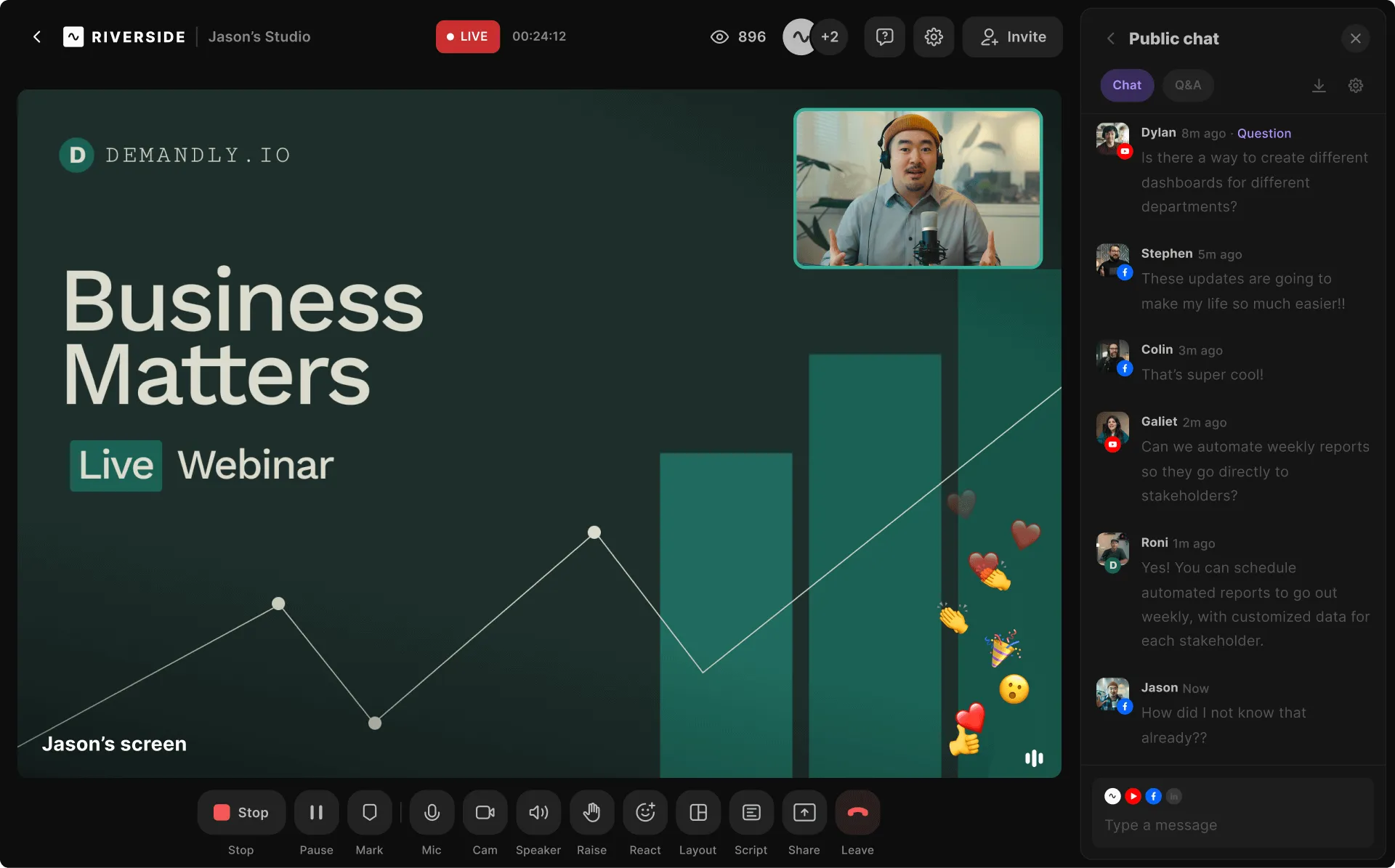
Webinars and Live Streaming
Riverside can also be used for live content.
The platform supports HD livestreaming to multiple destinations, including platforms such as LinkedIn, YouTube, Instagram, and Twitch.
For webinars and other live events, Riverside provides features for audience participation, including Q&As, audience call-ins, and chat management.
Businesses can customize their live events with branded overlays, logos, and colors. After a webinar finishes, the recording can also be repurposed into clips and summaries for future marketing content.
Riverside for Businesses and Marketing Teams
Although Riverside is useful for individual podcasters and creators, its tools are also designed for professional teams.
Marketing teams can use the platform for customer interviews, webinars, thought-leadership videos, podcasts, social content, internal communications, and other video projects.
Riverside specifically offers business-oriented capabilities for teams that need to collaborate and produce content at scale while maintaining consistent production and branding standards.
Instead of coordinating separate recording, transcription, editing, and repurposing platforms, teams can potentially manage more of the process from a centralized workspace.
Who Can Use Riverside?
Riverside can fit several types of content workflows. Podcasters can record remote guests and produce audio and video episodes. YouTubers and creators can record interviews and transform longer videos into shorter social content. Businesses and marketers can produce webinars, interviews, promotional videos, and branded content. Educators and professionals can use it for presentations and conversations, while production teams can take advantage of separate high-quality tracks for more detailed editing.
The platform is therefore not limited to one specific type of creator. Its broader purpose is to make professional audio and video production more accessible while reducing the number of separate tools involved.
From Recording to Finished Content
One of Riverside’s biggest advantages is the amount of the content-production process that can happen within the same platform.
A creator can invite guests, record a conversation, edit it through a transcript, improve the audio, add captions and branding, create short clips, generate supporting text, and prepare the finished content for distribution.
Riverside currently offers a free plan with no credit card required to get started, giving new users a way to explore the platform before deciding whether its broader features fit their workflow.
Discover Riverside
Creating professional content doesn’t necessarily require a traditional studio or a complicated collection of editing tools.
Riverside brings recording, editing, AI-powered production, content repurposing, livestreaming, podcast hosting, and publishing together in one platform. For podcasters, video creators, interviewers, marketers, and businesses looking to simplify their production process, Riverside provides a flexible way to move from an idea to finished content.
Whether you’re preparing your first podcast or managing an established content operation, you can explore Riverside’s tools and find a workflow that fits the way you create.