
Share This Article
Keeping a Mac running smoothly requires regular maintenance. Over time, systems can accumulate junk files, unused applications, and background processes that slow performance and consume valuable storage space. MacBooster, developed by IObit, is an all-in-one optimization and security tool designed to help Mac users improve system performance, protect privacy, and maintain their devices efficiently.
MacBooster combines powerful cleaning tools, malware detection, and performance optimization features to ensure Macs remain fast, secure, and organized.
What Is MacBooster?
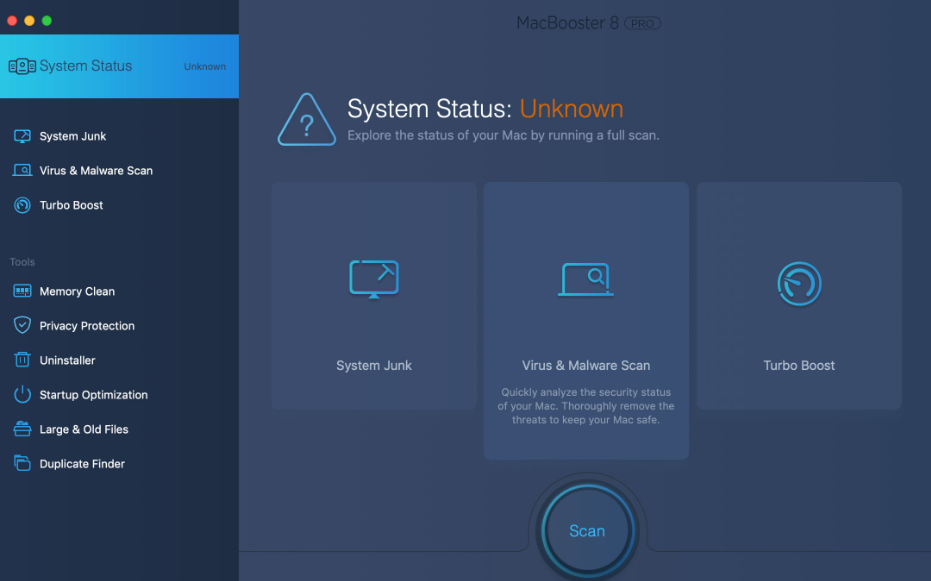
MacBooster is a Mac optimization software that helps users clean, protect, and speed up their macOS devices. It offers a suite of tools designed to detect unnecessary files, remove malware, free up memory, and improve startup performance.
The software focuses on several core tasks:
- Removing junk files to free up storage
- Detecting and removing malware or viruses
- Cleaning memory to boost system speed
- Protecting user privacy by removing traces of activity
- Optimizing startup items to reduce boot time
These tools help Mac users maintain system performance without needing advanced technical knowledge.
Key Features of MacBooster

MacBooster provides a wide range of features designed to improve both performance and security.
Malware and Virus Detection
One of the most important functions of MacBooster is its ability to detect and remove malware, viruses, and other security threats. This helps protect users from malicious software that may affect system performance or compromise personal data.
System Cleanup
Over time, Macs accumulate temporary files, system logs, cache files, and leftover data from deleted applications. MacBooster scans the system to identify and remove these unnecessary files, freeing up hard drive space.
Memory Optimization
MacBooster includes a memory cleaning tool that releases unused RAM. This helps improve system responsiveness, especially when running multiple applications.
Startup Optimization
Many applications automatically launch when the Mac starts, which can slow down the boot process. MacBooster allows users to manage startup programs and disable unnecessary ones.
Privacy Protection
The software also helps protect user privacy by removing browsing history, cookies, and other traces left behind by applications and websites.
Disk Optimization
MacBooster can analyze and optimize disk usage, helping organize files more efficiently and improve overall system performance.
Additional Maintenance Tools
In addition to its core features, MacBooster offers several useful utilities.
Duplicate File Finder
The software can scan the system to locate duplicate files such as photos, videos, or documents. Removing duplicates helps free up additional storage space.
Large File Finder
MacBooster identifies large files that may be taking up unnecessary space on the hard drive.
Complete App Uninstaller
Some applications leave leftover files even after being removed. MacBooster’s uninstaller ensures that apps are deleted completely along with related files.
Performance Improvements
By combining cleaning, optimization, and security features, MacBooster helps improve several aspects of Mac performance.
Benefits include:
- Faster system startup
- Increased available storage space
- Improved system responsiveness
- Reduced background processes
- Better protection against malware
These improvements help ensure Macs continue running smoothly even after years of use.
Available Versions
MacBooster is available in several license options designed for different user needs.
Lite Plan
The Lite version supports one Mac and includes lifetime protection along with system cleaning, malware removal, and memory optimization tools.
Standard Plan
The Standard version supports three Macs, making it suitable for households or users with multiple devices.
Premium Plan
The Premium version supports up to five Macs and includes all optimization and protection features.
All versions provide lifetime access and include customer support services.
Easy-to-Use Interface
One of MacBooster’s strengths is its user-friendly interface. Even users with limited technical knowledge can quickly run system scans and apply fixes.
With just a few clicks, users can:
- Scan their Mac for performance issues
- Review detected problems
- Clean and optimize the system instantly
This simplicity makes MacBooster accessible to beginners while still offering powerful tools for advanced users.
Trusted by Users and Tech Media
MacBooster has received positive feedback from both users and technology publications. Reviewers often highlight the software’s comprehensive toolkit and simple interface.
Many users report noticeable improvements in system speed after running system scans and cleaning tools. Others appreciate the built-in malware detection and privacy protection features.
Why Regular Mac Maintenance Matters
Even though macOS is known for its stability and security, regular maintenance is still important. Over time, systems can become slower due to accumulated files, unused apps, and background processes.
Using a maintenance tool like MacBooster helps ensure that:
- System storage remains organized
- Security threats are detected early
- System performance stays optimized
Routine optimization can significantly extend the lifespan and usability of a Mac.
Conclusion
MacBooster is a comprehensive solution for users who want to keep their Mac devices running efficiently and securely. By combining system cleaning, malware protection, memory optimization, and privacy protection in a single platform, the software simplifies Mac maintenance.
